Visualizzazione post con etichetta my story about using. Mostra tutti i post

mercoledì 13 aprile 2016

My story about using Eclipse

I started using Eclipse as my first Java IDE back in 2004.
I had always written code in Java, since version 1, but back in those days I was using some very simple editing (even the Microsoft Edit, it was even before I started using Emacs!) or some less expensive (in term of resources) IDEs.
My switch to a "real" IDE was during the fourth year of University, when I started using Borland. I remember the IDE was around 80 MB in size and required almost a minute to start on my Pentium IV. Nevertheless it was simple and to the point: it allowed me to develop in Java having syntax highlight, Javadoc inspection, project management and some other feature.
Ok, I have to say it was much more than I needed, since I was working on one or two projects at the same time back in those days. Morever, I was totally unaware of code versioning, and in fact I had developed my own way of doing incremental backups, but that's another story.

While approaching my master thesis, that of course had to be based on Java (not because of choice of mine), I started evaluating some other Java IDE. At that time the Forte For Java was a really famous piece of code, but it was a little hungry on resources and required almost two minutes to start up on my Celeron 700 MHz with 192 MB of RAM. Moreover, while the start up time was not such a big deal for me, having to work for a lot of hours without turning off the computer, the program itself was pretty much unusable with menus half-empty, rendering delays and freezes.
I tried then the Emacs extension for Java, but at that time I was a young Emacs users and the whole JDEE was too much complex for either my fingers and brain.
Having spent a couple of weeks searching for a product, I switched back to the Borland Java IDE, something I already know quite well and that allowed me to be productive from day one.

In the following years I experimented a lot with other two emerging products: IBM Eclipse and Netbeans IDE. However I was not working as a Java developer, or better, Java was not my main language after the university, and therefore I did not spent a lot of time using them for real projects.
In 2004 there was a shift: at the Principle and Practice of Programming Java (PPPJ) conference in Kilkenny I met Vivek Sarkar, an IBM fellow that shown us the magic power of Eclipse (and of Jikes RVM for what it matters). At that time there was Eclipse 2 (if my memory serves me well 2.2) and the main feature that astonished us was the "refactoring" capabilities of Eclipse.
Once I was back home I installed Eclipse and switched definitely to such environment, letting Emacs for quick-and-dirt editing.

Several year later, at the time of version 3, I got back to a Java-based job and developed an application with the Rich Client Platform (RCP), so I used Eclipse to develop another Eclipse application (a kind of recursion that computer scientist seems to appreciate very well).

Then I had to manage a PHP codebase, and did it with Eclipse too even if, I have to admit, the support to such language was not mature enough and the editor had some lag.

Today I use Eclipse on a regular day-by-day basis mainly for web development, and mainly for Java because I use Emacs for all the rest.

lunedì 11 aprile 2016

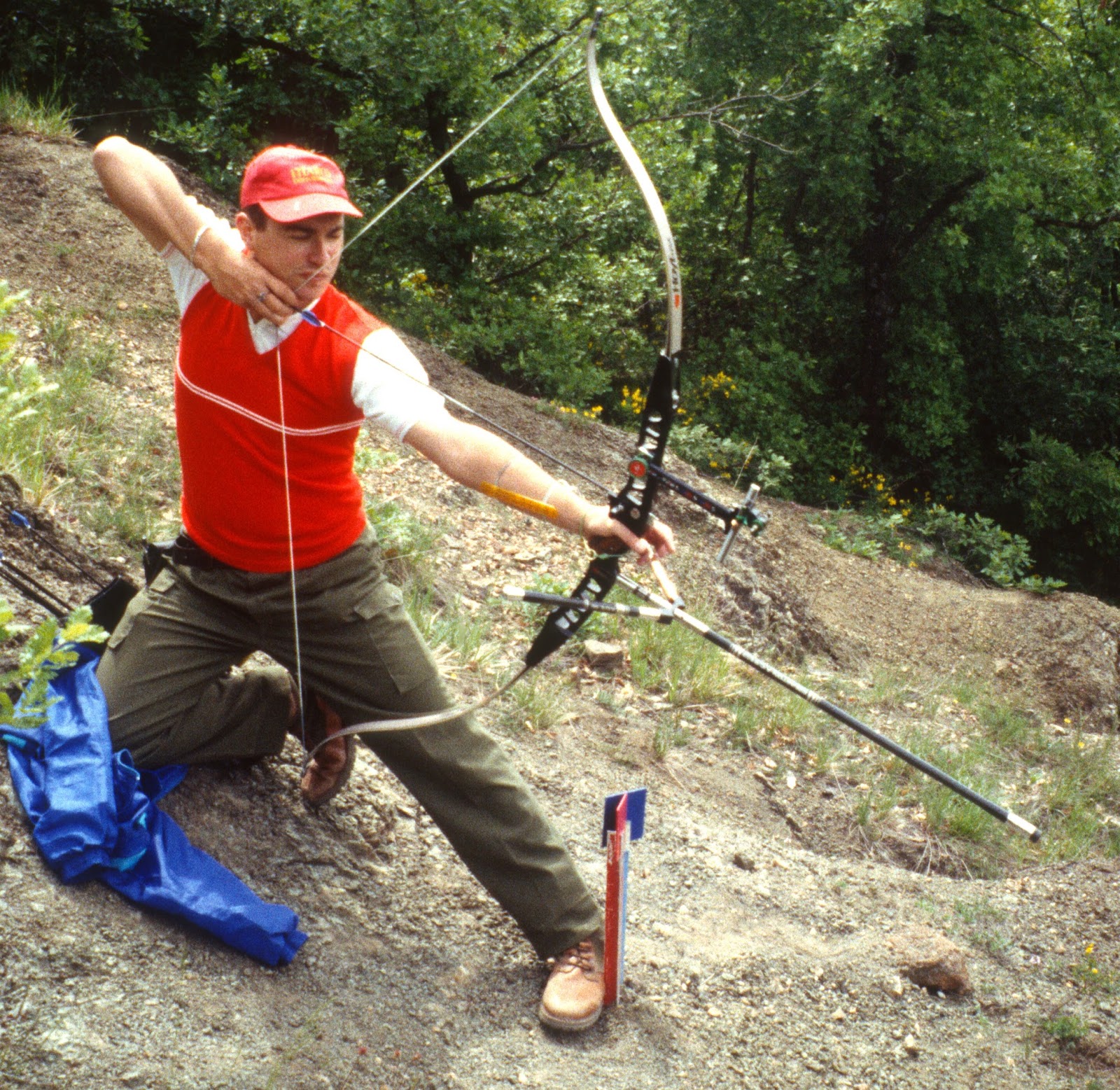
My Story about Archery: the riser

I began archery in January of 1990, at the age of 11.
Just after the first course I, as others, wanted to buy my own equipment but I was not allowed to do so. In fact, my teacher, seeing I had a passion for archery, decided to lend me a practice bow in order to make me save some money and get a more serious bow later on.
And therefore, I was able to get some bow-thing at home, and that has been a real boost in my archery passion.


A few months later it came the time for me to get a real bow: a black Samick SMT-7. That was essentially the same model as the more famous Browning SMT-7. I have to say my father bought me a whole equipment, ranging from the quiver (the first and only field quiver I ever had), the case, arrows, sight (a black T shaped model) and a central stabilizer (rod).


Approaching the Giochi della Gioventù my trainer lent me a more professional sight, to which I attached the clicker since I was using too much long arrows (another little trick in order to let my shoulders grow...).
After the Giochi della Gioventù I got also an Hoyt tunable v-bar, color gold, to which I attached two metal bars. I got also a new sight, a red Spigarelli (Spiga 30 if I remember well).


Then was the time for the greatest bow I ever had: an Hoyt TD/4 (the top riser at that time). My model was a second-hand, and therefore it was a little different from the model of that year, most notably it was frosted.


Before my first FITA competition of the 1992 season, my father drove me to the local archery shop and bought me a new ACE SS full stabilizing system, and the very next day I placed it into the bow directly on the field of the competition. That day I made my personal own record and started being of interest for many other trainers.
During that season I also changed the sight from the Spigarelli to the AGF Safari, a carbon-only sight with an inverse-T design.
With such equipment I got my first bronze medal at the national championships.


In 1993, stupidly, I ask my father to buy me another riser, another TD/4. I asked for having it black, my favorite color, but my father insisted to take it with another color, and so the last choice was deeper blue (essentially a light black). I hated such bow with a passion, I don't remember me getting any decent score with such bow.


In 1994, around Christmas, my father decided to buy me the second best bow I ever had: the Hoyt Radian.
It was a very innovative model, even if the idea of a milled riser was not new and we had already an Italian manufacter (Spigarelli, that at that time had produced two models), but, hey, that was the bow with which Andrea (Parenti) did win his second World Championship.
Three radians where available on the local archery shop: a blue one, a black one and a green one. You can imagine which one did I pick, can you?
If I remember well, the price for such a riser was 900.000 £, that is around 450 € while the TD/4 riser was half the price. It was the more expensive riser I've ever had.


Please note that I'm talking about the very first commercial model of the Radian, the one without the bushings for the rods and with those little bars as a front stop for the tiller adjustment.
With that riser I got my second individual bronze medal and a few team medals at the national championships.

In 1995, since I was doing a lot of archery, I was trying to replicate my equipment in seek of redundancy, and one piece I lack was the riser itself, and so I got another Radian. This time it was the "recent" version, meaning it had the bushings and the numbers in the pocket limbs. Horribly, it was colored in red (or better, magenta).
After a few months of training, I had given it back to the local archery shop exchanging it for other material.

After the Olympia games of the 1996 and the great impression of Justin Huish and his Hoyt Avalon, I bought an Avalon, giving back my black Radian.
Yes, it was a huge mistake.
Yes, it was bigger than huge, it was a stupid thing.
I have to say that the Avalon was a great riser, with a lot of interesting ideas borrowed (I suspect) from the PSE Centra, including the tilt of the limb pockets, two (fixed) positions for the button berger, a good design but a stupid big handle (similar to that of the TD/4).
After a summer of shooting, mine as much others revealed a crack just under the top limb pocket.
My father, able as usual, convinced the local archery shop to get it back and exchange it with a much more solid and well known Radian; the only condition was I had to accept the color, that was again that stupid and horrible magenta-red.


And so I did have a Radian again.
But the color was so horrible.
I hated such color.
And luckily, a few years after, me and a friend of mine were able to change color (do you remember it was an anodized riser, do you?), and guess what? I went for a black color.
The result was amazing: I got a black frosted Radian, something nobody else did have (and still do). The final result was like having it made of the same material of a barrel of a gun.

Today, that is still the riser I own and be sure for a thing: I'm not going to sell it.
I did not win anything with that, I did not get any personal record, but it has all the main features of my greatest bow ever: it is a Radian and it is frosted.

And yes, I blame myself for having sold either the white TD/4 and the first radian!

venerdì 29 maggio 2015

Me, myself and Dataflex

I hate Dataflex http://en.wikipedia.org/wiki/DataFlex with a passion!
Well, when I say that I hate Dataflex I should say I hate the so called "console" mode Dataflex, the only one I've ever worked on. And I have to also say that part of my hate is due to a wrong training, or better, no training at all.

How did I ever meet Dataflex (df31d)? Well, you know, the rent is a good motivation to work with tools you don't like very much.
Since the beginning the language itself appeared awkward to me. Coming from some real languages (C, Perl, Java), I felt not at home with a language case-insensitive.
The total lack of braces and the return to the BEGIN-END syntax was quite a shock.
No multi-line comments.
A compiler that crashed each time you had a line longer than 256 characters...and no, I'm not joking! I don't remember how many hours I spent trying to understand why a program was not compiling at all, without any error message, to just discover that somewhere I had a quite complex IF clause (indented) that has exceed the right margin. And I have to say that I often laugth thinking at this stupid bug, probably implemented in a way I only have seen in didactic examples of C such as:

#define MAX_LINE_SIZE 256
...
char current_line[ MAX_LINE_SIZE ];

However, I started writing my programs, and as usual with a new language, my first developments were baby steps in the Dataflex world. My programs were simple, written in a simple and well documented way, so that they looked even more stupid to me.

There was not an IDE to develop in Dataflex, so I fired up my Emacs to the aim. But it was not a simple task, since Dataflex was displaying masks on the screen using the DOS character set, that at that time was not shipped with Emacs. I had therefore to compile the appropriate encoding, add to Emacs, and configure the editor to load such encoding for every Dataflex file (.frm). At that time I was at the very basic of Emacs, and so it was quite an hard job to me.

As I said, I was coming from some experience with real languages, and if you can pass over the syntax and the buggy compiler, you cannot live without methods. Well, my Dataflex was without methods. I had two choice: define a "routine", invoked via a far jump (GOSUB) or use labels to far jump to other pieces of the programs (GOTO).


The operator set was...tiny. Moreover, many operators were verbatim, so that comparisons use GT,GE,LE,LT and so on.
Assignment was performed via a MOVE...TO command. If my memory serves me well, the only "smart" arithmetic operators were INCREMENT and DECREMENT.

To complete the nightmare, I did not have any kind of good documentation (and I was not able to find out any on the Web).

But you have the opportunity to define "macros", in the C language sense. Ok, this sounds good, until you clash some variable or loop name.

Last but not least, the compiler was reporting errors at lines with macro expanded. In other words, while the compiler was reporting an error on line X, your error could be a lot before due to some macro expansion.

After a while I was working with all this mess, I found the special DEBUG command. The purpose was to print out to the screen at which line the program was executing. But it was not very helpful, since it was just printing out a number (like 123) on the screen exactly where the cursor was, so filling your application of digits making me feeling I was looking at the Matrix screen.

Next I discovered the -v switch on the compiler, and I found it could be increased at least to -vvv to get more verbose messages. Or better, the messages were obscure as usual, but the processed file (with macro expanded) was printed on the screen, so that you can find out the line number with more accuracy.

Then came methods. Yeah! A great day, one that made me feel a bit more at home.
Well, methods in Dataflex are not what you would expect from other languages. The prototype is extremely verbose, the invocation reminds me to lisp since you have to put the method name in parentheses (as well as arguments):

(foo(1, 2, 3))

But hey, at least you have some real reusable code without the name clashing of a macro and with a return value!

The special key handling was a pure mess! Dataflex used subroutines to handle events generated by special keys, with some confusion on what, when, and how to resume the control flow.

The database structure was...not a database structure, at least in my opinion.
If my memory serves me well, you had to define a new archive (kind of ISAM) using a specific program, that ensured that the data file and the indexes (also separated files) where in place. The fresh archive was then added to the so called filelist, that was in charge of listing all available databases (it was a kind of schema to a RDBMS). Modifying an archive (e.g., adding a field) was of course a locking operation, so you had to schedule for maintanance. And being the filelist limited in size, you had a limited number of tables/archives in your deployment.

One way to overtake the number of archive limitations was to play with user paths: as happens with the concept of search schema in RDBMS, an user can have several copy of the same archive, with the same binary structure and different content, in different disk positions. Pointing to one or another would do the trick.
We used this in particular to scatter a few utility archives among users, so that every one could have its own copy.

Relying on the file system, data corruption was dumpered by the operating system and its own file system. Using Linux, luckily, there were no many corruptions, but ship happens, and so you had to run a specific tool to reindex the whole archive. Of course, this was another full-locking operation.

In general, the speed of data retrieval was good, but the approach was that of single record (opposed to the one of whole set), and therefore all programs contained long and nested loops to extract the information you need. The relational part of the query (e.g., join) was all in charge of the developer, and therefore missing a single attribute could destroy all your retrieve logic in a subtle way.

Ok, so there were BEGIN-END, loops, GOTO/GOSUB and locking operations...but the system workded. And it worked up to a few gigabytes of data, therefore I have to say I was quite impressed about.

Of course, you did not have the flexibility of SQL, and you did not have even a way to specify a query that was not "pre-built". Allow me to elaborate a bit more: as I said, you had to define indexes for every archive. An index defines how the archive can be read, that is in which order you can loop thru the records. What if you want to retrieve the record in another order? You have to either define a new index (but you are limited by number of indexes and locking operations) or to use existing ones in an esotheric way, making your loops even more complex and your program a lot less readable.

Last but no least: an index was not only an access method, but a way to define an unique constraint. Therefore, you were locked to only a few indexes for every archive, and the rest was a huge REPL.
There was also the catch-all looping mechanism: the sequential scan of the whole archive (also known as BY RECNUM).

Adding records was quite simple, a special instruction SAVERECORD was there for the aim.
Modifying a record was a little more complex, since you had to lock via the REREAD command, modify fields and then issue a SAVERECORD followed by an UNLOCK.

Perl came to a rescue.
At that time I was mainly using shell scripting, but here I needed something a little more complex to handle all the mess left around by Dataflex. For instance, I used a Perl script to convert and mangle output text before sending it to the printer. Dataflex was absolutely not good at handling text!
I also used Perl to control how the users jumped into the Dataflex runtime, and this allowed us to ease the management of the sessions when locking operations were absolutely necessary.
Finally, I used Perl to mangle some Dataflex source code in order to avoid some boring stuff.

I have to say that, in order to automate some looping, Dataflex provided WINDOWINDEX and FIELDINDEX, two special (global) varaibles to iterate over UI and database fields. Please note that the above variables were global, so a wrong initialization could make you fly to the wrong record or field!

Now, after all this mess, I have to say that I'm aware of a lot of good uses of Dataflex, that has also a kind of OOP interface. As I told, I had to work on a lot of legacy code, and without documentation and appropriate training, it was quite impossible for me to use "advanced" features.
As final word, please note that Dataflex was a quite old language, therefore it is obvious that when compared to modern languages it looks scaring and awkward.

But sometimes I still have nightmares about Dataflex!

martedì 10 febbraio 2015

My story about KDE

KDE is by far the Open Source project I used longer than all the others, of course excluding Linux itself, a few shells and to some extent GNU Emacs.

I first met the Kool Desktop Environment (KDE) when I was a student at university. At that time I was spending my time digging into this Linux-thing, as well as learning a lot of new cool Unix stuff.
At home, I had just installed a Red Hat 5.2, that was shipped with what I believe it was a prototype of some Gnome applications (I remember the configuration system was a GTK application). There was no KDE desktop at all.
At the university, there were machines running Debian GNU/Linux (with Gnome) and a few Solaris workstations with the CDE.
I liked CDE, I really did! It was quite clean to me, and I found the multiple desktop a very interesting idea. I also liked the panel with multiple menus, or docks or whatever their name was.
But my Linux box at home looked ugly, with FWWM2 and WindowMaker as the more advanced "desktops" available.

Later that year, I don't remember how, I found a distro called Mandrake.
And everything changed.
Mandrake was based on Red Hat (if my memory serves me well the numbering was pretty much the same) shipped with KDE installed as default desktop.
I was impressed from such piece of code: I felt at home with such an UI.
There was a dock, there were applications and a file manager that didn't suck (well, the Gnome one sucked for a while in my opinion), a lot of ready-to-go applications.
The look and feel was great, and it seemed that developers did spent a lot of time and effort in making all consistent. As an example, I remember even the window title animated when the size of the window did not suffice to make it all readable.

Well, at that time I was not doing a lot of stuff using Linux. I was just experimenting and trying to get some documents well written using an office suite (it was too early for me to learn some LaTeX!). Internet was something quite obscure outside of the campus, and I spent a few money chaning my winmodem to an external one that allowed me to use KPPP to connect to the Internet.
My KDE desktop had a classic configuration:


KDE did play an important role in my Linux conversion: the command line is quite scarying to anyone who is just learning, and having a fully integrated desktop (even more integrated than others) allowed me to sit in front of my computer and concentrate on learning, being assured that if I cannot do something via the CLI the UI would have done it for me.

So my university life continued using KDE and some KDE applications (e.g., the debugger) assisting me in the small homeworks. However the university was not using KDE at all, preferring Gnome desktops on both Linux and Solaris; I suspect the choice was done due to some issues between the Free Software Foundation and the Qt-KDE, as well as some major distro (like Red Hat) offering and supporting Gnome.
I have to admit that at some point in time, a few Solaris machines started prompting the user for a CDE/KDE alternative, but many students excluding me were using CDE because that was what the university teached us.


At that time it was a lot easier to find some help related to the Gnome desktop than to the KDE one, and the latter was something not well appreciated here in Italy, or at least not as strongly pushed as it was in Germany. But a few distros started shipping KDE and KDE-only installations, such as SuSE and Caldera. Feeling a little less alone in using my desktop of choice, I sticked with it and continued to use and explore.

I believe a huge jump in quality was at the time of KDE 2, where the "component" model become more and more apparent to the bare user. I'm not talking directly at KOM (and Corba related stuff), even if that was the engine under the hood, but to the fact that an application could do a many things because they were simply available to the desktop as a whole. So for instance you could open a PDF file into a web browser, or use a web browser to see a directory tree (and not with the horrible apache-like web interface), and stuff like that. That was a kind of impressive cohesion amongst the application components.


In those years I did not have a broadband Internet connection, so the only thing to do in order to have a fully fresh KDE desktop was to wait for some magazines to issue with a set of CDs. And most of the time updating from such CDs was a pain, and that was how I become quite good in doing backups and restoting a working machine from scratch, but this is another story.
By the way, at a point in time I got a Red Hat 9 shipped with KDE 3, which was really cool. The look and feel, the applications and the themes were pure eyecandy. And how to forget the great work done by Mosfet (and the incident that occurs with Pixie)?
That was the time of my master thesis.


Having acquired more confidence in the desktop itself, as well as in the toolchain required to build it, I started to build my own versions. That was not so simple, since I had to download all sets using the Internet connection of my job place and then let the computer doing the hard work. My poor Intel Celeron was busy all day compiling KDE in background, and you cna imagine how responsive it could have been at peeks! But it did not matter, in less than a week I could have a new KDE version up and running on my system!
The 3.3 release, with the bubble titles and that great icons was really impressive to me.


I did that until version 3.5, and then, shame on me, I switched to Microsoft Windows for a while. That's because I was doing a kind of University project, and having university laziness on me, I didn't want to spend a lot of time in configuring my laptop.
Luckily, as when you got drunk, the bad effects go away sooner or later, and so I quickly joined back KDE. At that time a distro in particular was famous in the KDE panorama: Kubuntu. I installed 6.04, if my memory serves me right, and liked the idea of having a KDE-specific distribution. I still use Kubuntu on a lot of machine of mines.

The jump to KDE 4 was quite a shock, even for me that I have followed the decisions and improvements. However, once I got used to the new interface and look and feel, I was at home again. And of course, I was not expecting the big vendors shift, but was running 4.0 as soon as it was considered stable. I laugh remembering a colleague of mine that, in the act of emulating, get messed with KDE 4.0 and was forced to switch back to something he knew better. He does not know KDE a lot even today, sorry pal!


Even if the desktop was not so complete as in previous versions, the ideas behind it were really promising. In particular the widgets and SVG graphic were winners in my opinion (and in fact were "migrated" to other popular proprietary platforms).


In the last years my KDE-aggressiveness has calmed down, and now I follow only stable and mature branches, even if I'm always excited when I get the opportunity to get a new release.

And yes, I've not switched yet to Plasma 5...I was a lot busy at the time. But I'm going to try it very soon.

venerdì 1 marzo 2013

My story about using Perl

I first met Perl on a book related to Red Hat Linux 6: at the end of the book there was a few chapters about programming and deploying on Linux and one of those chapter was dedicated to Perl.
However at that time I was not interested in Perl at all and I thought Java was the only true language.
Oh poor my!
The fact is that I was a young university student and I was truly believing what teachers were telling me, and teachers were truly believing what Sun Microsystem was telling them...
A couple of years later I start being interested in Perl. The truth is I was interested in this cool scripting thing that allowed me to build up very complex programs using little pieces and combining them and, oh mama look, you don't have to compile and deal with pointers and type declarations and all other stuff that real big programs require you to focus on. And by the way, the final result is the same.
Having read something about Perl in a Linux book, as already stated, I thought that Perl was the right language for me to learn to jump out "boring" Shell scripting and do even more. Therefore I asked to my
girlfriend (err..now ex-girlfriend) to buy me the camel book for  Christmas, and she did, and so I passed my holidays reading about Perl. Ok, the Italian version of the camel book was quite horrible, due to wrong translations and formatting, and therefore I had to read it more than once to get even the simpler concepts.
In the beginning I was rejecting Perl. What the hell, why should I write something like:

print "Hello World!" if( ! $rude );

while in all the other structured C-based programming languages I know I have to write:

if( ! $rude )
  print "Hello World!";

Well, I have to admit, Perl has a quite weird syntax, and can be confusing in the beginning (this is the reason why I appreciate Python, even if I don't know it very well). However, as the camel book authors' say, you don't have to exploit every piece of the syntax and can do a baby-like programming. And so I started doing a baby-like programming. But excluding some really tiny personal projects, like file formatting and text mangling, I was not developing very much in Perl.

A few years later I was in charge of administering one University laboratory made by a few Sun Workstations.
One of my tasks was to generate a lots of accounts for all the students  attending the courses. My tutor was a Shell addicted, and therefore was using some poor-quality Shell scripts to do the job. I was a junior administrator and I was not aware of programs like pw and similar (neither was my tutor!) and therefore I wrote a quite long Perl script that did all the job including creating directories, shares, profile files
and passwords. I think this was my first real Perl program at all!

A few months later I was consulting for a factory that was using an Hylafax server to send faxes, and I was in charge of producing a report about outgoing faxes and I used Perl again to study the server logs. In a few hours I did the job!

From the above I was realizing that Perl allowed me to solve complex problems, or apparently complex problems, with a few lines of code and in a more elegant way than Shell did. And so I start using Perl for a lot of
small glue applications.

One day I even used Perl for a kind of evil aim, or better to contrast an evil task. My boss was angry with me and therefore gave me a stupid task to make me waste my time: substitute in almost one hundred source files a few strings, recompile them and deploy. Since I was forced to do it connected to a remote machine without any kind of file sharing (and therefore to use locally a powerful editor) and an X server, my boss thought this would have kept me busy for half a day. I spent half an hour writing a Perl script that did all the job for me and I spent the rest of time on the Web! Well, I have to admit, that if I knew Emacs as I know today I would have rather used it, but that was the power that Perl gave me: I was able to code what I wanted to do in a simpler manner even if I had not or did not know about the right tool to use!

At the university I was also in charge of teaching programming languages, that at that time were C and Java. I asked the professors several time to let me do even one single lesson about Perl, without success (again, I guess it was the Sun Microsistem evangelism...). And I found that Perl was rejected not only as a language to teach, but also
as a language to use: when I told my colleagues I was using Perl in my consultancy they were looking at me as I was a poor developer. I felt like they were judging me as I was not able to write an OOP program and compile it, linking and running it, and therefore I needed something simpler to write and launch. And I think this is still true here in Italy, since Perl (and to some extent even Python) is seen as something that you use only if you are unable to design a system full of objects and messages.

By the way, I was happy with Perl and continued to use it as my glue private tool.

A few years later I was in charge of developing my first Web application, and of course the tool I used was Perl. At that time CGI seemed to me the right tool to use, but of course it was not the right choice since more powerful framework like Catalyst were recommended. Anyway, the application was developed quite fastly and did what was required. Unluckily, the client decided later to rewrite the same application using Java and a client-server approach. Despite the latter, the size of the code (not its quality) was at least four times of the Perl one!

Today I would like my day to day job involves Perl, but as already stated I believe this great language is not well understood here in Italy, and therefore I have to use it again as my private glue tool.

sabato 16 febbraio 2013

My story about using Linux

As for a lot of other Linux users and sysadmins I first met Linux at university. At that time I was attending a C-programming course which aim was teaching students about system calls, and in particular POSIX system calls (e.g., open, lseek, read, write and so on). One of the laboratories was running Debian Gnu/Linux (without X) and was used to let us connect to another laboratory where Solaris machines were in charge of students accounting. Of course, being lazy as a lot of other computer scientist, going to the laboratory just to test and run my small applications sounded to me like a huge waste of time, and therefore I decided to test applications at home, using my home desktop computer. 

It was years before the virtualization trend (and in fact a few years later a society called VMWARE was releasing its first version of virtualization stack) and therefore I had to install Linux on the bare hardware. I got a 3GB ATA hard disk that I placed on the slave controller of my desktop computer, and a friend of mine gave me a CDROM containing Red Hat Linux 5.2. And so I started spending time to install this operating system.
At that time it took around 2 hours to install the whole system (and gadgets) on my Celeron computer, but it was nice.

Of course, as others Windows-ized users did (I guess), I worked entirely as root because, you know, you are not so stupid to break the whole system with a miswritten command! And in fact, one evening while trying to make X running on my machine I corrupted something so that my system was no more able to execute X. And of course I did not have a backup of the modified files, and trying to solve the panic I generated I break out something else so that the only reasonable choice for me at that time was to reinstall everything from scratch.

Lesson learned: do backups and work as root as less as possible!

Last I was able to make X run on my computer, and at that time it was FVWM, that I suspect it is the most horrible windowing system I've ever seen. However I was so happy of my configuration that I called my parents to show them how beautiful it was my running system. And I suspect they did not understand my excitement for a few windows that
looked like the Microsoft Windows ones after your video card has  crashed.

By the way, I was in the Linux tunnel and started doing some  development stuff with it. However I was not able to use it for day-to-day work because, quite frankly, I had no day-to-day work. Moreover, configuring peripherals was a mess: I had to buy an external modem because my winmodem was useless with Linux. Making the printer, an HP on the parallel port to work was a little easier, but not at zero time. At that time the only way for me to get a new Linux distribution was buying some magazine with CDROMs included, since
downloading with a 56kb/s modem was a pain. And this is how I discovered a release based on Red Hat Linux, called Mandrake, that was shipped with KDE preconfigured. I was impressed! At glance the KDE was like a beautiful version of the CDE I was using sometimes on the University Solaris machines, and had a lot of things and gadgets that made me feel like at home.

In the meantime I started reading an Italian magazine entirely dedicated to Linux. At first, it was boring for me: who cares about how to install mod_perl on an Apache web server? I did not know what Perl was, and what Apache httpd was, and was interested only in getting all stuff connected to my computer to work! But as days passed, I was more and more interested in all kind of stuff that was related to Linux and the software you could run on it.

Some of the University projects I did were slightly related and tied to Linux, so I also started using it for a kind of day-by-day work, until it came my master thesis. I had to develop using Java, and therefore the choice among Linux and Windows was optional, but since I knew that would have been the last time I had to experiment without being fired, I choose to boot my laptop with Linux and force myself to use it. 
And I never looked back!

At that time I was running Red Hat 7.3, with KDE 3.0 and a lot of  peripherals were working out of the box, and others were either useless or I was not interested in getting them to work (e.g., the winmodem, since I was using the Ethernet cable to connect to the University network). That was the time I started writing my own small utilities (oh, and in the meantime I also learnt Perl) to backup my files, archive them, and so on. On one hand, I did not have the experience (and the will) to search for and study existing software, and on the other hand, I was recognizing the power of this system that allows you to write everything you want and, most notably, allows you to do. In fact, there was no need to download a complex IDE with a C compiler, I already had gcc. There was no need to download and install some extension for file scavenging and bulk renaming, I could write a three line script...

My first job was still tied to Linux, and I have to admit that I suspect I found such job because other friends of mine did not get the University chance for learning Linux. Unluckily, I had just to administer machines
running Linux, since I had also to use a compiler that was licensed only for Microsoft Windows, and therefore my computer was booted into Windows. But as soon as out of work, my laptop was running Linux!
Then, a special day: we got a compiler license for Linux. 
And my laptop did not boot Windows anymore!

Using it day by day also on my own machine allowed me to improve my skills on a lot of aspects, including scripting and programming. In those days I was addicted to KDE in a particular way, and therefore my poor laptop was forced to compile again and again every new version was released, and this was the cause for having it to run a "little" slower. But I was gaining time since I did not have to install SSH clients, X clients, and other fancy stuff since I had all there, in my black-foreground terminal window.

A few years later, for a reason I don't remember any more, I got a new job and I was not in charge of doing any particular development, but on the other hand, had to work with Microsoft Office. For that reason I started to boot my laptop into Windows again, and after a while I was booting it into Microsoft Windows only.
That was fine: after all I was simply writing articles, doing some Java development and teaching students, so after all I was not doing any serious work (and to some extent, nothing really productive). And then again I got a job where I was developing, administering and managing
on Linux machines. And again, I switched back to Linux for my own computer and the happiness reached myself.

A few years later, my wife got an EEE PC running Windows that was unusable. I installed Linux on it and used it for running even server applications when doing demos at conferences. And that was the time
I made my wife switching to Linux too.

Today I use Linux and other Unix systems (FreeBSD in particular), even at work, even if not suggested in doing so. 
Sorry pals, I got so much development power than I don't feel the need to apologize!

venerdì 8 febbraio 2013

My story about using IBM Eclipse

For one reason or the other, my jobs always required the development of Java applications. I was used to work with Borland JBuilder, and the main reasons were it was simple but powerful and did not waste  megabytes or RAM making me wait more than 30 seconds to start and be fully functional. Nevertheless, it had some limitations, and so I was thinking to switch to a more complex and heavy environment, in particular NetBeans.
Then, at the 2002 PPPJ in Kilkenny, I attended the keynote speech of Mr. Vivek Sarkar that was at that time employed at IBM and therefore presented Eclipse 2. After the speech, while having a coffee, I asked what were the differences between Eclipse and NetBeans and why use one instead of the other. The main reason I got was the code refactoring, so once at home I installed Eclipse and tried it on my code base. At glance I did not like it: it was too heavy and complex, with too many functions and windows and tabs and other annoying stuff (I'm a terminal guy...). But the code refactoring was really impressive and I found it really useful.

So I started using Eclipse for my day-to-day development. 

Today it is still my Java default IDE, and I have noticed that a lot of people use it as a kind of fancy editor with autocompletion, without using some of the more interesting features like run configurations and Mylin.
In one of my previous job I had to create a client-server Java application that should have been really fast to run on Microsoft Windows and Apple machines. So I thought it was time for giving a try to SWT, the IBM Java toolkit Eclipse is based on. 

From SWT to Eclipse RCP the jump was fast and great, and therefore I started developing applications using Eclipse RCP v3.

sabato 2 febbraio 2013

My story about using GNU Emacs

GNU Emacs is surely the program I use for the most of the time I spend in front of a computer. It is the first program I install into a new machine and it is my favourite editor.
I started using GNU Emacs back to the days when I was an university student. In those days I was attending an Operating Systems course that was based on Unix, and being Unix a system where handling text files (both for configuration or programming) is so important, the course had a particular focus on the vi text editor. 
I have to admit: I hate vi with the passion. Is not that I don't see how powerful it is, but I find the editor too awkward for me to use in day-by-day activity. 
Am I in the editing mode? Command mode? Aline mode? What is that ~ at the beginning of each line? You get the idea of what I was thinking!

However, at that time I both did not have the choice to switch to another editor (because the exam had to be done in vi!) and I did not have enough skills to evaluate another editor.
The only choice was therefore to study vi and try to understand why my professors were so excited in using it. And my hate raised up again when I discovered that they were teaching us a really inefficient way of using the editor itself. As an instance, the official course documentation mentioned the :wq! way of exiting the editor without forgetting to save the current file. Well, good luck with make then! I found that ZZ was a more intelligent way of exiting having the editor to save only if really needed, and therefore without modifying the file metadata and without firing up a make each time. Well, begin an university course, the projects were really limited to a few files, so having to run make each time was not a big deal, but the fact is that each tool should be used in the much proper way. As another example, there were no explaination about splitting windows, regular expression search and so on. After all, they were teaching vi much more like an Unix Notepad application!
Actually, I see a lot of my colleagues that still proudly use vi in a very elemntary way, and others that have chosen to switch to Notepad++ because it is much more powerful.
Sorry guys, you are using the tools in the wrong way!

Last but not least, not only university was teaching vi in a bad way, but for the worst reason ever! In fact, one reason to study vi was that "it is an editor you can find on any Unix installation". I discovered years later that it was not true at all, and in fact many Unixes does not include vi in the base system. Another reason gave to us from the professors was
that "it can run even when X Window does not work", and while this is true, I have to mention that professors were using SSH to connect to servers from Microsoft Windows clients and that none of the servers at the university were running X Window. So who cares if the editor works or not with X?

Once the Operating System course was over, I decided to study another editor for my incoming Unix activity, and since I did not want to waste my time learning some naive program, I decided to give a try to the other World's Dominating Editor: GNU Emacs.
Well, I cannot explain why, but the GNU Emacs commands were simpler for me to remember than the vi modes one, even if I have to admit that both have a very cryptic set of keyboard mappings! The only drawback of Emacs at that time was the resource consumption: Emacs required a few megabytes, around 32/64, and for my poor Intel Celeron 700 MHz with 192 MB of RAM it was a big deal to load the editor. But once
it was loaded it was fast and responsive. And by the way, it was much lighter than Forte4Java or Eclipse!
At least Emacs had a status bar (the mode line) and the minibuffer and there was also a X port, even if I never used it because I wanted to learn the "real" terminal one application. For a lot of time I was using Emacs as a pure editor, and the set of commands I knew were the basic ones that allowed me to do the routinely work. And I was proud to be almost the only guy that was firing up Emacs instead of vi in the whole laboratory!

Then came the days of my master degree thesis. As usual (for me), I decided to use the thesis as an excuse to learn other tools, so I picked up Borland (now Inprise) JBuilder for the Java development, LaTeX and Emacs for writing the documentation, Umbrello UML Modeller and Dia for the diagrams and pictures. Everything was going fine, and my LaTeX file was growing quickly: at the end it was more than 84000 words and more than 9300 lines. Emacs was working diligently, without showing any problem with such a big file. Almost at the end of the thesis, when I was relaxing and enjoying the last days of work, I decided to give a try to other editors: Kate (the default editor for the KDE environment) and Kyle (an ad-hoc editor for LaTeX). The result was horrible in both cases: Kyle was crashing on each forward-search I was doing, and Kate was extremely slow even in jumping from the beginning to the end.
This little and simple experiment convinced me that there was no need to search for another good editor, and that Emacs was what I needed for almost every job.

The next year I was working as sysadmin and developer and I was using Emacs for pretty much everything I did including scripting, Perl  programming, text processing and so on. The only programming  language I was not using Emacs for was Java, since I was switching to Eclipse (a tool I still use for Java development). In particular I had also to
develop in a strange language, Dataflex, that is similar someway to Cobol. I was disappointed to see that Emacs did not had a specific major mode for such language, but at least it was something I could use for doing my programs!

I continued to use Emacs for several years, pretty much for any editing that does not involve a whole IDE. And often I fire up Emacs when I want to have a quick view at files or folders without having to start
a more complex and heavy tool. Sometime I try other IDEs, because I believe that one should always try everything, but sooner or later I always come back to Emacs. The "heavy" factor is no more important these days: Emacs has not grown in size as other tools (like Eclipse) did, and therefore is fast to load and always responsive.

Last year I decided to study Emacs Lisp, in order to improve both my developer and Emacs skills. I have to admit that elisp is not my ideal language, but it is fun enough for me to write some function to  instrument the editor to do what I want, when I want, where I want. And this is the power of Emacs.
Today a lot of people think at Emacs as a text editor, but Emacs is a text editor as much as Eclipse is a Java IDE: this is not true! 
Eclipse is a whole Java platform on top of which the IDE is the mainstream product and Equinox is the reference platform;
Emacs is a lisp interpreter on top of which you can work with files. 
This is what I see.

Today, thanks to Org mode, Magit, Autocomplete and other features, Emacs is really a great environment to spend the whole day into.